
Paste a Figma frame link. MidaGX rebuilds the design on your real page and you launch it the same day. No export, no dev ticket, no credit counter.















The variant is approved. Everyone in the review agreed it looks better. The hypothesis is written. And then it sits in a dev backlog for three weeks, because the only way to put a Figma frame in front of real visitors used to be to have someone build it.

Paste a Figma frame link and MidaGX reads the design
AI rebuilds it as a variant on your live page and tells you what it changed
Attach a goal, split your traffic, publish

All of it happens in the browser, on the page you want to test.
In Figma, right click the frame you want to ship and choose Copy link to selection. MidaGX needs a link to a specific frame, not the whole file.
Open MidaGX on the live page you want to change. Paste the link into the chat box, or use the Figma button next to the composer.
MidaGX rebuilds the design against your page and reports what it changed. Check desktop, tablet, and mobile, then refine anything that looks off by asking in plain language.
Pick your conversion goal, split traffic, and publish. From here it is a normal Mida experiment with normal Mida reporting.
Prefer a walkthrough with screenshots? Read the step-by-step Figma to A/B test guide.
Most tools that show up for "A/B testing in Figma" count opinions on a static design. Useful, but a different question.

What it runs on
Your live website
A static frame
Who sees it
Real visitors trying to buy
Teammates and panel voters
What it measures
Signups, purchases, revenue
Which design people prefer
Control group
✅ Your current page
❌ None
Statistical significance
✅ Built in
❌ Vote counts only
Ends with
A shipped page and a number
A decision meeting
Both have a place. We wrote up when each one is the right call in Figma A/B test plugins vs real A/B testing.
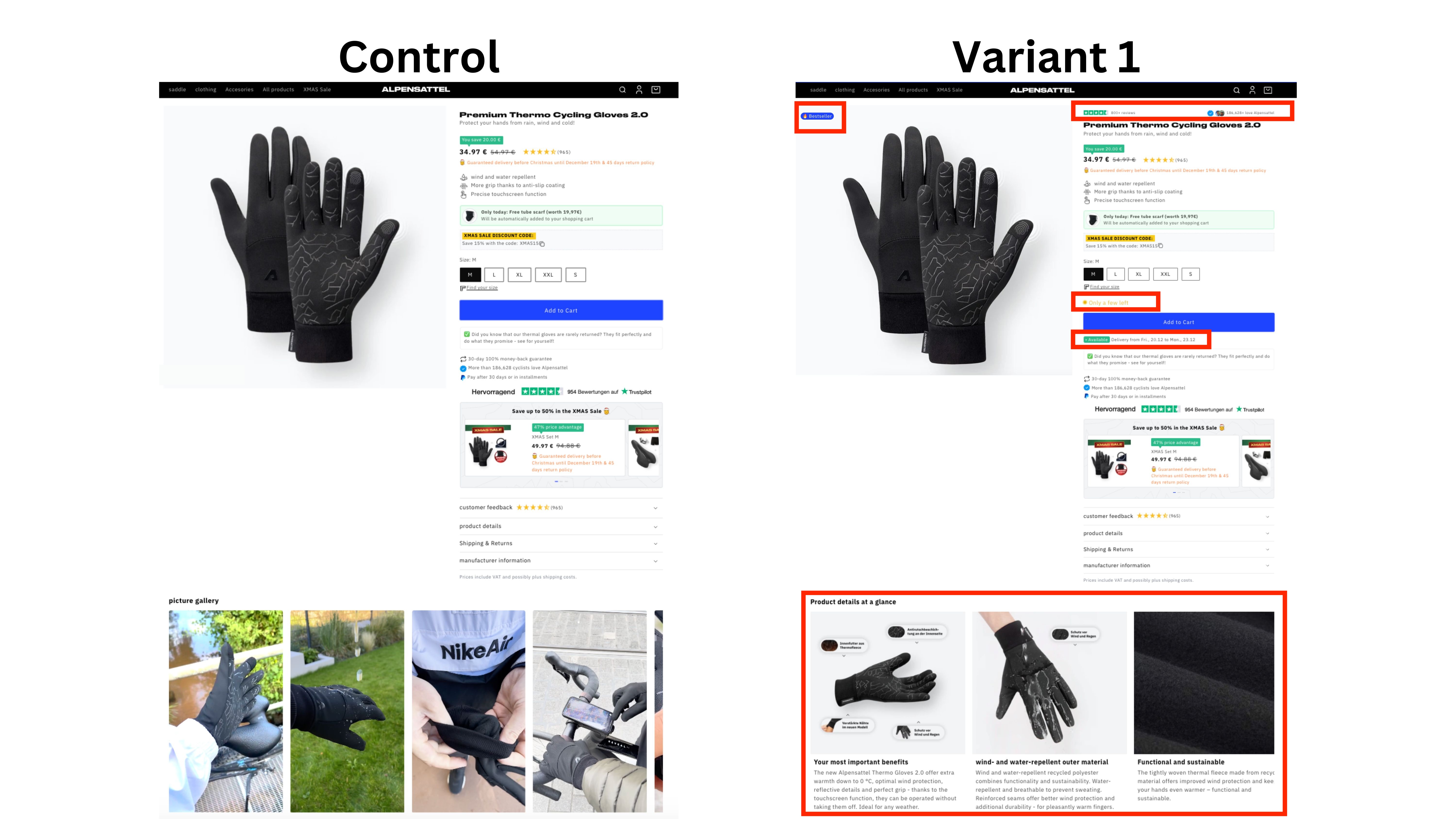
MidaGX is not limited to swapping a headline. If the frame is a whole page, it rebuilds the whole page. That means the redesign you have been arguing about internally can be settled with traffic instead of taste.
Full page redesigns and new landing page concepts
Hero sections, pricing tables, and product detail pages
Works on Shopify, Webflow, WordPress, Framer, or a custom build
Rebuilding a design is rarely one shot. You import the frame, look at it on mobile, change your mind about the CTA, and try a second direction. On tools that meter AI by the credit, that iteration is the expensive part. Every paid Mida plan includes unlimited MidaGX AI credits, so it is not.
Unlimited MidaGX AI credits on every paid plan
Free Sandbox plan includes 30 credits a month and 100,000 monthly tested users
15KB script, so the variant does not cost you page speed
Most teams already know which variant they want to test. It is sitting in a Figma file, approved, and waiting for developer time. Figma A/B testing with MidaGX removes that wait: you paste a frame link, AI rebuilds the design on your live page as a test variant, and you split traffic to it the same day.
The slow part of most CRO programs is not deciding what to test. It is getting the approved Figma frame built into a page a real visitor can load. That handoff is the step MidaGX removes.
MidaGX applies the design to your actual site in the browser, so the test measures real buying behaviour on real traffic instead of opinions collected on a static prototype.
Every paid Mida plan includes unlimited MidaGX AI credits. You can rebuild a frame, refine it, and try a second direction without watching a monthly quota.
The whole workflow happens in the browser on the page you want to test. There is no export, no code handoff, and no separate staging build.
No. You paste a link to the frame. There is no PNG export, no dev mode inspection, and no code handoff. MidaGX reads the frame and rebuilds it against the live page.
Not entirely, and we would not claim otherwise. MidaGX handles on-page changes, which is what most A/B tests are. Backend logic, new data, and structural app changes still need a developer.
MidaGX builds against the page it is running on, so it works with the styles your site already loads. If a design depends on an asset your site does not have, ask MidaGX to adjust it in plain language and it will rework the variant.
Figma plugins collect preference votes on a static design from people you send a link to. That measures opinion. A Mida experiment splits real traffic on your live site and measures signups, purchases, and revenue.
On paid plans, MidaGX AI credits are unlimited, so importing and refining a design does not draw down a quota. The free Sandbox plan includes 30 credits a month.

Yes. Paste a link to a Figma frame into MidaGX on the page you want to change. MidaGX rebuilds the design as a variant on your live website, then you set a conversion goal and split traffic to it. There is no export step and no developer hand-off.
No. You paste a link to a specific frame, copied in Figma with Copy link to selection. MidaGX reads the frame and rebuilds it against your live page. No PNG export, no dev mode inspection, no handoff document.
Minutes for most single-page designs. Paste the frame link, review the generated variant across desktop and mobile, set a goal, and publish. The slow part of the old workflow was waiting for developer time, and that step is gone.
Figma plugins collect preference votes on a static design from people you send a link to. That measures opinion. Mida splits real traffic on your live site and measures signups, purchases, and revenue. Both are useful, but only one of them tells you what happens to your numbers. More on that in Figma A/B test plugins vs real A/B testing.
MidaGX builds against the page it is running on, so it works with the styles your site already loads. If a design depends on an asset your site does not have, ask MidaGX in plain language to adjust it and it will rework the variant.
On every paid Mida plan, MidaGX AI credits are unlimited, so importing and refining a design does not draw down a monthly quota. The free Sandbox plan includes 30 credits a month. See pricing for the full breakdown.
Yes. MidaGX runs on your live page in the browser, so it works on Shopify, Webflow, WordPress, Framer, and custom-built sites.
Not entirely, and we are not going to pretend otherwise. MidaGX handles on-page changes, which is what the vast majority of A/B tests actually are. Backend logic, new data, and structural application changes still need a developer.
Paste a Figma link, launch the test, let your traffic decide. Free up to 100,000 monthly tested users.

Mida.so is a super lightweight A/B testing tool to help you experiment, analyze and implement conversion strategies in minutes.


Still deciding?
A quick screen share on your actual site — no slides, no generic tour. Just your questions answered.
30 min · no commitment · no sales pressure